2026 CAGD Validation
As payroll systems evolve in Ghana’s public sector, the Controller and Accountant General’s Department (CAGD) continues to modernise how salaries are validated and paid to government workers. A key part of this effort is the GoG Employee Payment Voucher (Gogepv) system, an online platform that ensures secure validation and certification of monthly payment vouchers before salary disbursements are made.
In this comprehensive guide, you will learn how to activate and validate your GoG Employee Payment Voucher account for 2026, ensuring you’re ready for timely payment processing and compliance with CAGD requirements. The guide covers step-by-step account activation procedures, common pitfalls, best practices, and helpful tips to ensure your credentials are set up correctly.
What Is the GoG Employee Payment Voucher (Gogepv) Platform?
The GoG Employee Payment Voucher (EPV) system is an online portal designed to support Ghana’s public sector payroll management. It allows authorised officials — usually payroll officers, heads of departments, and HR personnel — to validate payment vouchers each month before salaries are authorised by CAGD for release.
Until recently, many government agencies used manual paper-based vouchers for payroll validation. The transition to digital platforms like Gogepv and the earlier e-SPV (Electronic Salary Payment Voucher) system has significantly enhanced transparency and efficiency in payroll administration across ministries, departments, and agencies (MDAs/MMDAs).
Why Activation and Validation Matter in 2026
Before any salaries are processed, CAGD requires that payment vouchers be validated and signed off online by authorised personnel. Failure to validate vouchers in time can delay salary payments for employees or require corrections in subsequent months.
Activation of your CAGD account and credential setup is therefore a critical first step in the payroll cycle. Without a validated and active account, you cannot:
- Log in to the voucher system
- View or approve payment vouchers
- Certify payroll data for your organisation
- Initiate salary validation for processing
Account activation and validation ensure payroll accuracy and help protect against issues like payroll fraud or unauthorized payments.
Part 1 — Preparing to Activate Your Gogepv Account
Before you begin, make sure you have the following:
1. Official Appointment as a Validator
Only duly appointed payroll validators — typically HR officers or designated authorised officials — can activate an account. If you are not on the validator list, contact your payroll administrator or head of department.
2. Valid Personal Information
You’ll need accurate personal details matching records held by CAGD or your HR unit, including:
- Employee number
- Full name (as per official records)
- Contact details (especially a mobile number)
- Email address
3. Access to Your Mobile Phone Number
A valid mobile number is required because the system uses OTP verification during account activation and password setting. Ensure the number you provide is active and accessible.
Part 2 — Step-by-Step Activation Guide
Here’s how to successfully activate your GoG Employee Payment Voucher account for 2026:
Step 1: Receive CAGD Approval
After your appointment as a validator, your details must be configured in the CAGD system by an administrator. Once approved, you should receive an SMS from CAGD with an activation link.
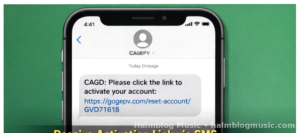
➡️ If you haven’t received this, contact your regional CAGD office or payroll administrator.
Step 2: Visit the Gogepv Password Reset Page
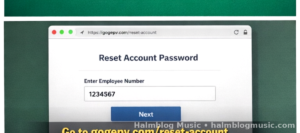
👉 Go to: https://gogepv.com/reset-account
This is the official portal used to initiate your account activation by setting your password.
Step 3: Enter Your Employee Number
• On the page, enter your employee number exactly as it appears in official payroll records.
• This must match CAGD’s records for the activation to be recognised.
Step 4: Verify Through OTP
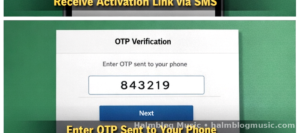
• Once the system recognises your details, it will prompt you to enter a One-Time Password (OTP).
• The OTP is sent to the mobile number linked to your employee record.
Enter this code precisely. This step confirms your identity and prevents unauthorised access.
Step 5: Create a Secure Password
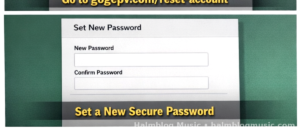
After OTP verification:
- Choose a strong password that is easy for you to remember, but not easy for others to guess.
- A good combination includes lowercase, uppercase, numbers, and symbols.
Always prioritise security because this account controls access to sensitive payroll validation tools.
Step 6: Successful Account Activation
Once your password is set and verified:
✔️ You now have an active GoG Employee Payment Voucher account
✔️ You can log in to validate monthly payment vouchers
✔️ Your credentials are linked with the CAGD system for 2026 and beyond
Part 3 — Validating Payment Vouchers in the System
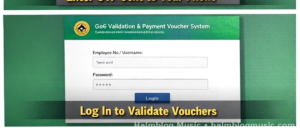
After successful activation, follow these steps to validate payment vouchers:
Step 1: Go to the Login Page
The primary login location is usually the Gogepv portal restricted to authorised users. While exact login URLs may shift as systems are upgraded, many officers still access login portals similar to older interfaces like gogepv.com used for e-SPV functions.
Step 2: Enter Credentials
• Your username (employee number or designated username)
• Your newly created password
• Complete any required CAPTCHA or image verification
Step 3: Review Pending Vouchers
Once logged in, you will see vouchers awaiting validation for your management unit. Follow these verification basics:
- Confirm employee names are correct
- Ensure salary figures match HR records
- Spot any inconsistencies, including duplicate entries or missing staff
Step 4: Approve or Query Vouchers
In most systems:
➡️ Approve the voucher if everything is accurate
➡️ Return for correction if discrepancies are found
Properly validated vouchers are then transmitted to CAGD for final processing.
Troubleshooting — Common Activation Issues
Issue 1: No Activation Link Received
➡️ Contact your regional CAGD office for assistance. Many administrators can resend activation details or update contact information.
Issue 2: OTP Doesn’t Arrive
✔️ Check your mobile network signal
✔️ Ensure the number on record is correct
✔️ Ask your administrator to verify your mobile number with CAGD
Issue 3: “Details Not Found” Message
✔️ This usually means your employee number isn’t in the system for activation yet
✔️ Confirm with HR that your validator appointment was submitted correctly
Best Practices for Your CAGD Gogepv Account
1. Keep Your Contact Information Updated
Any changes to your mobile number or email must be updated with your HR office so OTPs and activation links reach you.
2. Use Strong Passwords
Avoid simple or predictable passwords. Instead, use a mix of symbols, numbers, and uppercase letters.
3. Log in Regularly
Don’t wait until the last day to validate vouchers — early credential checks reduce errors and processing delays.
4. Consult Your Regional CAGD Office if Unsure
If issues persist during validation or activation, CAGD offices have personnel trained to support validators.
Security Tips for Validators
🛡️ Never share your password or OTP with anyone.
🛡️ Change your password periodically.
🛡️ Always log out after your session.
🛡️ Do not use public computers for accessing sensitive payroll platforms.
Since the system affects national payroll integrity, strict security improves the accuracy and legitimacy of salary validation.
Why the 2026 Activation Matters
For the 2026 payroll validation cycle, inactive accounts or expired credentials result in:
- Delayed payroll submissions
- Payroll bottlenecks affecting salary disbursements
- Administrative overhead for corrections
Account activation is not just a one-time step — it qualifies you to perform monthly validations throughout the year.
Conclusion
The 2026 CAGD Validation and Payment Voucher Account Activation Guide empowers government payroll validators with the knowledge they need to activate and manage their GoG Employee Payment Voucher accounts. By following the outlined steps — from receiving your activation link to logging into the voucher portal and validating payment vouchers — you ensure compliance and efficiency in public sector salary processing.
Account activation not only guarantees that you can access the portal but also supports broader objectives of transparency and accountability in Ghana’s public payroll administration. Getting started early and understanding these steps will smooth monthly validation workflows and help ensure timely salary payments for all employees under your management unit.
Read this:
20 Most Successful Independent Music Artists
How to Write Professional Music Opinions and Reviews: The Ultimate Guide
A Comprehensive Guide To SSIS 469
100 Easy General Knowledge Questions and Answers In English [2025 Edition]
How to Draw a NIKE LOGO: 7 Easy Steps
How to Download Videos from Facebook in 2025?
liveeamoment. org: The Friendly Way To Embrace Mindfulness
https://audiomack.com/halmblogmusicgh